A Tiny Privilege Escalation by Abusing Dangling Templates
Hello, friends!
Many moons ago, before Locksmith was even a twinkle in my eye, I noticed something weird. When you delete an enabled certificate template, its name can stick around in a Active Directory Certificate Services (AD CS) Certification Authority’s (CA) certificateTemplates property even though the template object itself has been deleted.
I thought “huh, I bet you could create a new template with the same name and it would be enabled.” I tested, and sure enough, the new template was enabled without going through the usual enablement process.
In the four years since that revelation, I would occasionally try different configurations to escalate privileges from a low-privileged user to something more powerful. And once, in early 2025, I got something to work, but I could never replicate it… (Note to future self: try to do research when fully awake…)
But then in late October 2025, I finally identified a repeatable process for taking advantage of this “deleted but not disabled” template situation to enable templates without specific rights to do so! I got really excited thinking I’d found a privilege escalation issue. Maybe I’d get my own ESC or CVE!
Spoiler alert: I hadn’t.
I reported the issue to MSRC who quickly closed the case. It turns out, I’d misunderstood some PKI role definitions and conflated some other stuff. Microsoft correctly pointed out this was a misconfiguration issue, not a security boundary bypass. But in my opinion, it’s still a weird quirk worth understanding and definitely something you want to clean up in your environment.
I know I just barfed a bunch of terms that sound like nonsense to the uninitiated, so let’s break it down. (If you’re familiar with AD and/or AD CS, you can skip to the fun stuff.)
First… What is an Object?
For example: I could create a $car object that represents my real-life car. I would define the following properties for it:
- Color: Red
- Make: Toyota
- Model: Prius
- ProductionYear: 2011
- Mileage: 221,455
- CurrentPassengers: Jake, Vida, Benny
When I want to do computations involving my car, I don’t use the actual car. Microchips do not work with macrocars.
Instead, I can create an object called $car which looks and behaves like an idealized version of my car. I can reference the various properties of $car by tacking the property name on like this: $car.Make which is equivalent to Toyota. I can change passengers in my car by doing something like $car.CurrentPassengers = @('Jake', 'Kari'). Objects are cool.
This is relevant to AD because almost everything in AD is an object with properties. For example: AD users are represented by user objects. user objects have some properties that describe the real users they represent (like Name, manager, and drink) as well as other properties that describe the object itself (like distinguishedName, nTSecurityDescriptor, and whenCreated.)
So What is a pKIEnrollmentService Object?
A pKIEnrollmentService object represents the Certification Authority (CA) service running on a CA host computer. Like other AD objects, it has several properties. Many of a pKIEnrollmentService object’s properties are shared with other objects in AD (distinguishedName, nTSecurityDescriptor, whenCreated), but every pKIEnrollmentService object also has a unique property which is the subject of today’s article: certificateTemplates.
What is the certificateTemplates Property?
In short, the certificateTemplates property on a pKIEnrollmentService object defines which certificate templates are enabled for enrollment on a specific Certification Authority (CA) service on specific CA host computer. It contains a list of “common names” (aka CN) of certificate template objects that will be visible to end users.
The property looks like this graphically:
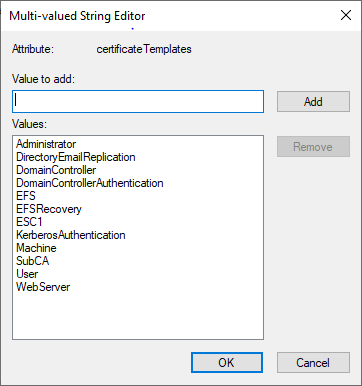
And like this in the console:

The Certification Authority snap-in uses the certificateTemplates property to generate this view:
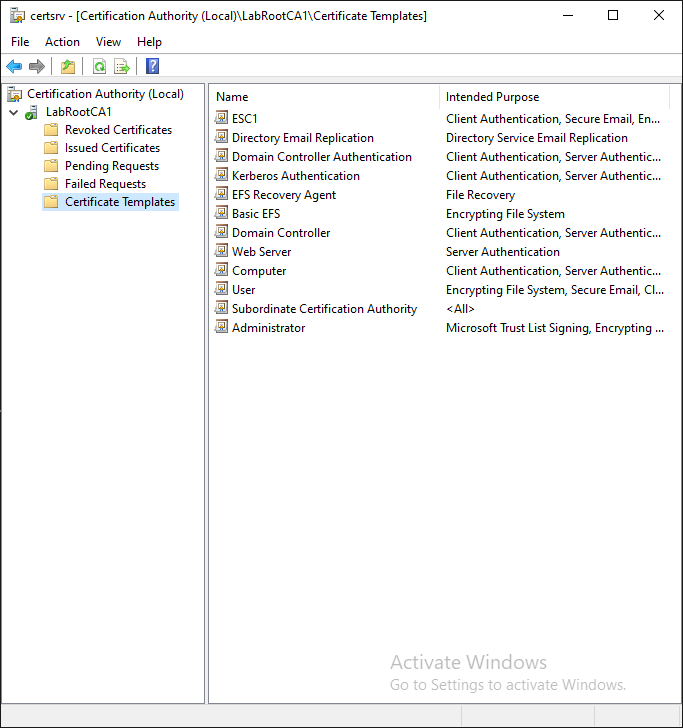
Wait… Did I Miss Something? What is a Certificate Template?
AD CS attempts to make administration of a Public Key Infrastructure (PKI) a bit simpler by introducing a concept of “certificate templates”. A certificate template pre-defines or auto-generates much of the information that is required when a user requests a certificate.
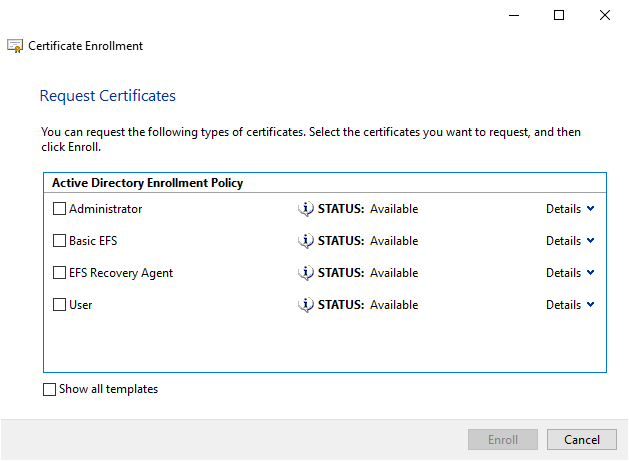
If you’ve ever created a Certificate Signing Request, you know there’s A LOT of information needed. Templates eliminate much of that complexity. End users no longer need to stress about properly setting options like “key length” and “validity period” and “extended key usage”. Instead they can request a “Basic EFS” certificate which has most of that stuff pre-filled by a PKI administrator.
Templating really does make PKI administration and use simpler in the Microsoft world.
Certificate Template + “Enabled for Enrollment” = ???
When enabled for enrollment, a certificate template is visible to end users in a couple different locations, including the dialog box shown above. That’s all that term means. An individual user may or may not have the rights to actually receive a certificate created by a specific template, but if it’s enabled, they can at least see that it is enabled.
Side note: A disabled template will not be visible and should not be usable… but that’s a topic for another blog. 😉
A One Sentence Recap Before the Fun Stuff:
When a template’s name is listed in the
certificateTemplatesproperty of one or morepKIEnrollmentServiceobjects, the template is enabled for enrollment.
Alright, enough background. It’s time for…
The Fun Stuff
I’d like to shed light on the concept of “dangling templates” in AD CS and demonstrate how they can be exploited to enable a certificate template for enrollment without requiring the typical rights.
What Is a Dangling Template?
As detailed above, the certificateTemplates property of a pKIEnrollmentService object keeps track of which certificate templates are enabled on the Certification Authority (CA) that object represents. A “dangling template” occurs when the CN (Common Name) of a certificate template remains listed in this property after the template has been deleted.
This is what enabled templates look like in the Certification Authority snap-in:
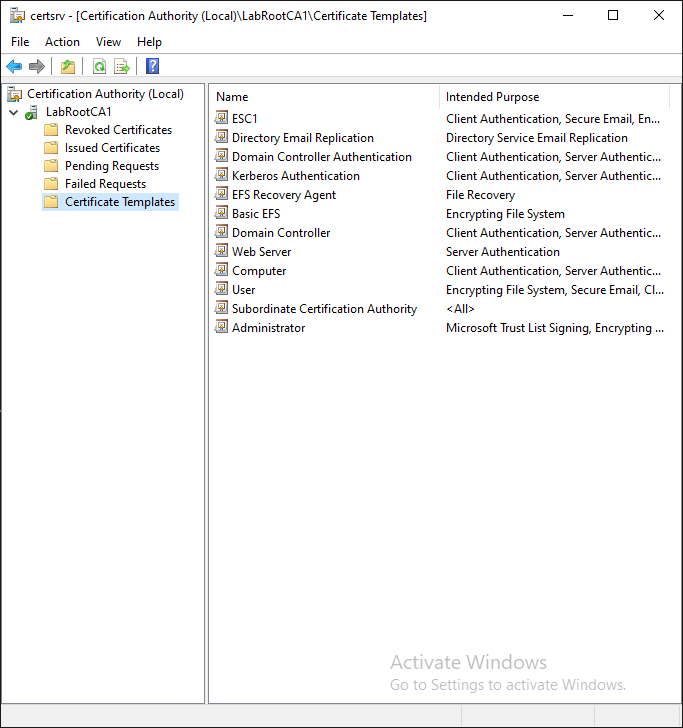
I will now delete the “ESC1” template. I will not modify the certificateTemplates property of LabRootCA1 to remove “ESC1”.
The exact same snap-in now shows an issue. A dangling template, if you will:
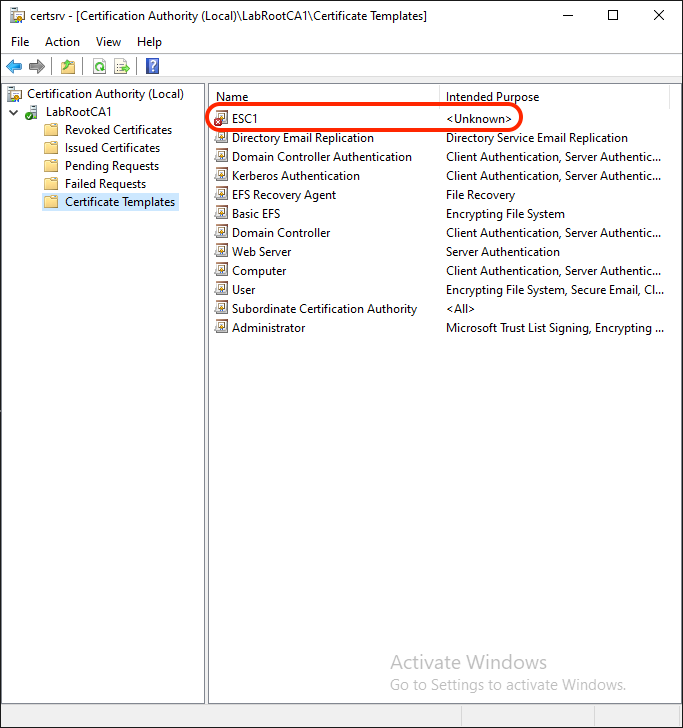
This situation happens because the certificateTemplates property still includes “ESC1”, but the template object named “ESC1” no longer exists.
The Problem With Dangling Templates
So what’s the problem with dangling?

Since enabled templates are managed via a list of common names, a dangling template leaves an opportunity for an attacker to reuse the common name of a deleted template and enable a template of their own.
A Dangling Template Attack
By default, enabling a certificate template for enrollment requires a principal meets one or more of the following conditions:
- Is a member of a forest’s Enterprise Admins (EA) group.
- Is a member of the Domain Admins (DA) group in the root domain of a forest.
- Has been granted the “Manage CA” right on the CA itself. (not the
pKIEnrollmentServiceobject that represents the CA!)
Typically, this operation is performed by opening the “Certification Authority” snap-in, right-clicking the “Certificate Templates” folder, then clicking “New” => “Certificate Template to Issue” as shown in the image below:
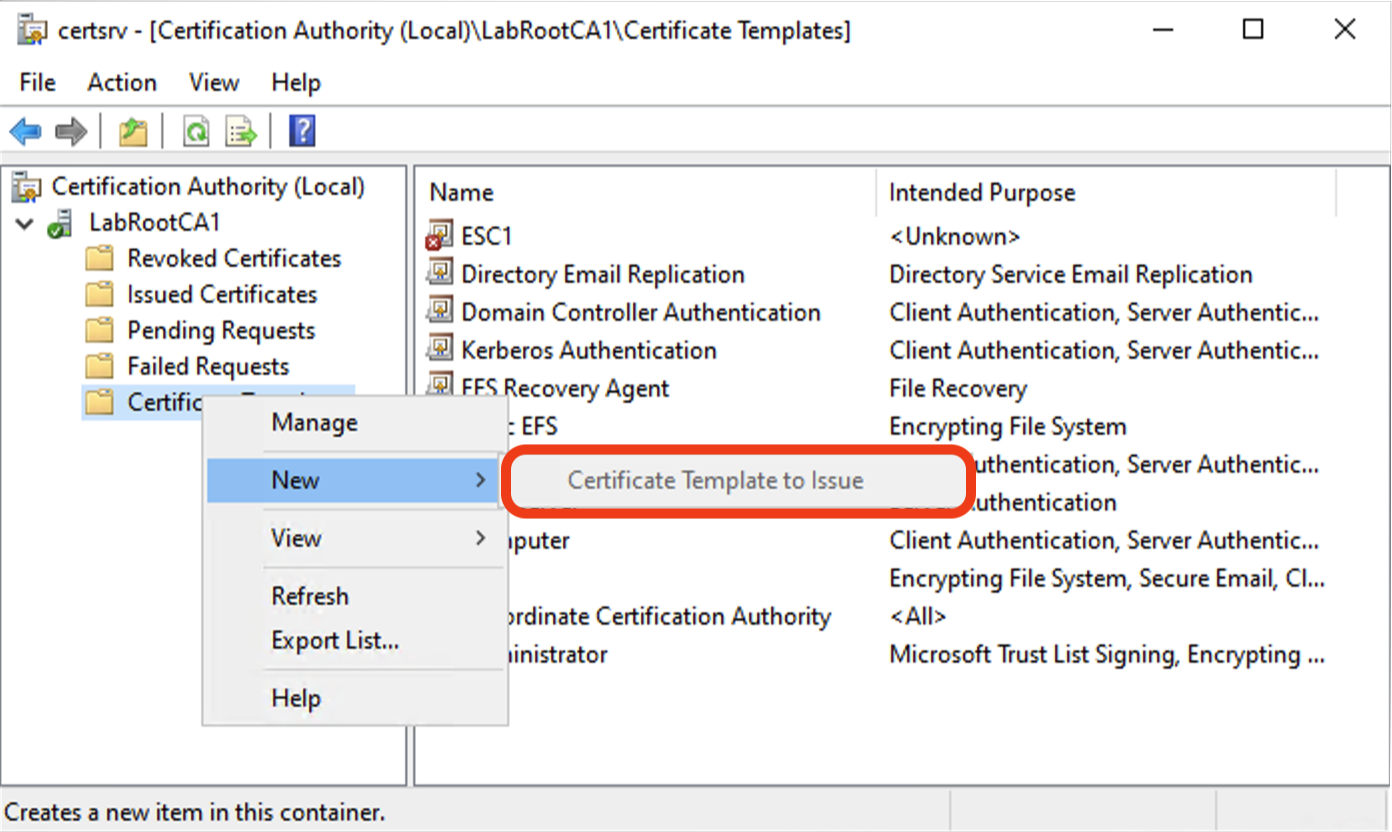
As you can see in the image above, “Certificate Template to Issue” is greyed out because my user account does not have the rights required. It is not a EA, DA, or CA Administrator so has none of the rights required to add a certificate template’s CN to the certificateTemplates property and complete the “New” => “Certificate Template to Issue” process.
However… it does have a few other rights.
You see, while I was setting up a lab one day, I realized I never dug deeply into the differences between the “Issue and Manage Certificates” and “Manage CA” roles available as part of AD CS.
As I was poking about on learn.microsoft.com, I found a page titled “Administering Certificate Templates” which included a section called Delegating Template Management. In this section, permissions required to do various tasks are laid out pretty well. I saw the “Create New Templates” task and had an ah-ha moment. If I could create a new template that the same CN as a deleted but still listed in certificateTemplates(aka dangling) template, I could publish any type of template I wanted.
I granted the required permissions to my low-privileged user account and tried to open the Certification Authority snap-in. I was hit with an access denied error.
Then I remembered you need to be granted one of the AD CS roles to be able to use the Certification Authority snap-in. So I logged in as a Domain Admin and granted my normal user the “Issue and Manage Certificates” role.
Now, I could log into the Certification Authority snap-in, and as expected, I was unable to Enable a template for enrollment. Everything was going to plan. I opened the Certificate Templates snap-in and created a new template that reused the CN of a deleted but “enabled” template. I flipped back to the Certification Authority and refreshed the enabled template list. The previously dangling template was dangling no more!
Excitement Overwhelms Rationality And I Screwed Up
In my mind, I just demonstrated that:
a less-privileged user granted the specific combination of “least-privilege” rights described in Delegating Template Managementcan exploit the lingering
certificateTemplatesentry to enable a certificate template despite not being granted the rights to do so.Dangling templates leave the door to unintended privilege escalation hanging open.
I’ve been working with AD CS for a few years now. In my work, I approach AD CS from a defender’s perspective and focus on detection and remediation. But I’ve always wanted to discover a privilege escalation technique of my own so I can get an ESC (or even a CVE!) for the clout. I’m human, y’all!
So, following standard responsible disclosure protocol, I reported my concerns to MSRC on November 4, 2025. On December 6, 2025, they informed me the case had been closed:
The alleged issue requires PKI admin privileges like CreateChild on the CertificateTemplates and OID containers and does not constitute a bypass of a security boundary but instead constitutes a misconfiguration/logic issue.
I was a bit confused by this language… my user account wasn’t granted the CA Administrator role, only “Issue and Manage Certificates”. That’s not an administrator!
It was only while writing this article and digging more into Common Criteria definitions of PKI-related roles did I realize my mistake. I was correct that the Certificate Manager role is not an administrator, but I was incorrect in assuming AD rights were required. AD rights are not required to perform that role’s task: issue and revoke certificates. That’s all in the CA itself.
More distressingly…. I had conflated “Template” with “Certificate” in my head. I’m ostensibly an expert (🤮) in this stuff, and I still got tripped up. But as my friend Graham Gold recently stated eloquently in a LinkedIn post (paraphrasing):
mental models do not always line up with runtime reality, and that’s where security issues appear.
Okay, Now the ACTUAL Fun Stuff
While this wasn’t a violation of privilege, and I didn’t get my coveted ESC/CVE, this was still an interesting exercise to dig into. Now you can replicate it at home!
Prerequisite Permissions
A malicious actor (or low-privileged user) can exploit this vulnerability if they possess the following permissions:
- Certificate Templates Container
CreateChild (pKICertificateTemplate)- OR
CreateChild (AllObjects) - OR
GenericAll. - Note: this is administrator-level stuff
- OID Container
CreateChild (msPKI-Enterprise-Oid)- OR
CreateChild (AllObjects) - OR
GenericAll. - Note: this is administrator-level stuff
- pKIEnrollmentService Object (CA)
Issue and Manage Certificateson at least one CA with dangling templates.
Exploitation Demo
Step 1: Environment Preparation (Privileged User Role)
As a privileged user (BA/DA/EA), set up the environment as follows:
- Create a low-privileged user:
- Username:
attacker.
- Username:
- Grant Permissions:
- Assign
CreateChildon the Certificate Templates container. - Assign
CreateChildon the OID container. - Assign
Issue and Manage Certificatesfor an existing CA, i.e.LabRootCA1.
- Assign
- Create a Dangling Template:
- Duplicate an existing certificate template.
- Use the following properties during duplication:
- Display Name:
DanglingTemplate. - Template Name:
DanglingTemplate.
- Display Name:
- Enable the Template on the CA:
- Open the “Certification Authority” snap-in
- Right-click the “Certificate Templates” folder
- Click “New” => “Certificate Template to Issue”
- Select
DanglingTemplate. - OR Add
DanglingTemplateto thecertificateTemplatesproperty onLabRootCA1with the AD management tool of your choice.
- Delete the Certificate Template Object:
- Delete the
DanglingTemplateobject from the Certificate Templates container. - Important Note: Do NOT disable the template on the
LabRootCA1.
- Delete the
- Verify Dangling State:
- Refresh the enabled templates in the Certification Authority snap-in.
- Observe that
DanglingTemplateis now marked as missing (red X on the template name as shown above).
Step 2: Exploitation (Low-Privileged User Role)
As the low-privileged user (attacker), exploit the dangling template as follows:
- Open the Certificate Templates snap-in.
- Duplicate any existing certificate template. During duplication, set:
- Template Name:
DanglingTemplate(matches the deleted template’sCN). - Display Name:
Hacked!. - (Optional) Configure malicious properties, such as ESC1 attributes. 😈
- Template Name:
- Save the new template.
Step 3: Confirm the Exploit
- Return to the Certification Authority snap-in and refresh the enabled templates.
- Verify that the
DanglingTemplatenow appears asHacked!..
The (not actually low-privileged) low-privileged user has successfully enabled a new template without elevated rights required to typically enable the template by exploiting the dangling template’s dangling state in the CA configuration.
Solution: Mitigating the Risk
The root cause of this behavior lies in AD CS’s reliance on CN values to track enabled templates. To mitigate:
- Administrators should audit their CA configurations and clean up dangling template entries.
- Permissions for low-privileged users should be carefully reviewed and restricted, especially on the Certificate Templates and OID containers.
Both of these issues can seem pretty daunting, but you’re in luck, reader… Locksmith 2 already identifies unexpected Certificate Manager rights and will soon identify dangling templates!
Ultimately, this isn’t a true privilege escalation. However, Microsoft should enhance AD CS to track enabled templates via objectGUID instead of CN. Using the objectGUID property offers unique and immutable identifiers and would eliminate this issue completely!
Closing Thoughts
The presence of dangling templates in AD CS represents a minor misconfiguration with potentially significant consequences in poorly managed and misunderstood Microsoft PKI environments (aka most of them). By understanding how these work and limiting permissions for low-privileged users, organizations can reduce the risk of unauthorized template enrollment.
If you have encountered similar scenarios or have additional insights into PKI security, feel free to share your thoughts! You can find me @ jakehildreth.com