Exploring ESC5: Abusing The certificateTemplates Attribute
Hello, friends!
A couple weeks ago, I introduced the concept of “dangling” certificate templates in Active Directory Certificate Services (AD CS). This little bit of AD CS weirdness quickly became my most popular article even though it requires multiple misconfigurations to exist for successful abuse. While I’ve seen this specific combination of misconfigurations in real life, what I’ll describe in this article is much more common and could happen with a single misplaced access control entry (ACE) on a single property: certificateTemplates.
The Scenario
Imagine you’re a motivated network defender. You hire a penetration testing firm to find and poke the squishy bits of your network. They immediately find a certificate template which meets the following conditions:
- Creates certificates that can be used for client authentication
- Allows the use of a subject alternative name (SAN) during enrollment
- Is enabled for enrollment on one or more CA
- Allows low-privileged principals to enroll
- Does not require authorized signatures to be included during enrollment
- Does not require manager approval for a certificate to be created
This set of conditions describe the infamous “ESC1” template. Templates that match this set of conditions are extremely dangerous because they allow low-privileged principals to request and immediately receive a certificate that can be used to authenticate as any other principal in the environment, including AD Admins or Domain Controllers. 😱 Bad stuff.
The pentest firm uses the template to request a certificate that allows them to impersonate your Domain Admin account. With a certificate in hand, they authenticate as your DA and perform a DCSync attack. GAME OVER.
 ▄█▀▀▀▀  ▄█▀█▄  ██▄ ▄██ ██▀▀▀▀▀   ▄█▀▀▀█▄ ██   ██ ██▀▀▀▀▀ ██▀▀▀█▄
██  ▄▄▄ ██   ██ ██▀█▀██ ██▄▄▄▄    ██   ██ ██▄ ▄██ ██▄▄▄▄  ██  ▄██
▀█▄  ██ ██▀▀▀██ ██ ▀ ██ ██        ██   ██  ▀███▀  ██      ██▀██▄
  ▀▀▀▀▀ ▀▀   ▀▀ ▀▀   ▀▀ ▀▀▀▀▀▀▀    ▀▀▀▀▀     ▀    ▀▀▀▀▀▀▀ ▀▀  ▀▀▀
An Easy Fix!
Being a motivated defender 💙, you immediately disable this template on all Issuing Certification Authorities (CAs) in your environment. The penetration testing firm congratulates you on your quick attention to the matter, your CISO gives you a 50% bonus, and your manager gives you a pony.
Not So Fast!
GAME OVER. AGAIN.
 ▄█▀▀▀▀  ▄█▀█▄  ██▄ ▄██ ██▀▀▀▀▀   ▄█▀▀▀█▄ ██   ██ ██▀▀▀▀▀ ██▀▀▀█▄
██  ▄▄▄ ██   ██ ██▀█▀██ ██▄▄▄▄    ██   ██ ██▄ ▄██ ██▄▄▄▄  ██  ▄██
▀█▄  ██ ██▀▀▀██ ██ ▀ ██ ██        ██   ██  ▀███▀  ██      ██▀██▄
  ▀▀▀▀▀ ▀▀   ▀▀ ▀▀   ▀▀ ▀▀▀▀▀▀▀    ▀▀▀▀▀     ▀    ▀▀▀▀▀▀▀ ▀▀  ▀▀▀
         ▄█▀█▄   ▄█▀▀▀▀  ▄█▀█▄   ▀▀██▀▀ ██▄  ██    ▄▄  ▄█▀
        ██   ██ ██  ▄▄▄ ██   ██    ██   ██▀█▄██    ▀▀ ██
        ██▀▀▀██ ▀█▄  ██ ██▀▀▀██    ██   ██  ▀██    ██ ▀█▄
        ▀▀   ▀▀   ▀▀▀▀▀ ▀▀   ▀▀  ▀▀▀▀▀▀ ▀▀   ▀▀         ▀▀
What Happened?
As described in the dangling templates article, the only thing that defines whether a certificate template is enabled for enrollment is exceedingly dumb.
- In AD, a
pKIEnrollmentServiceobject represents the CA service running on a computer somewhere in your forest. - When a template’s common name (
CN) is included in thecertificateTemplatesproperty of one or morepKIEnrollmentServiceobjects, that template is enabled for enrollment in the forest. - If a low-privileged principal can modify the
certificateTemplatesproperty, they can enable and disable templates at will.
The last bullet point is described in AD CS parlance as an “ESC5”. I’ve previously described ESC5 as the “hand-waviest” of all ESCs since it describes vulnerable access controls on basically all non-template AD CS objects. There are tons of non-template AD CS objects with wildly varying levels of risk presented by each.
I actually reached out to Will and Lee, the progenitors of the ESC nomenclature, last week in preparation for this article. Lee essentially confirmed the “hand-waviest” status:
[W]e were closing up on the research by this point (and getting sick of ADCS :P), so it’s a bit overly broad since we didn’t dive into all objects in that container :D
As you might’ve already guessed, the second pentest firm modified the certificateTemplates property on a pKIEnrollmentService object and reenabled the template you disabled after the first pentest. Once enabled, the pentesters requested a certificate that allowed them to authenticate as a Domain Admin.
Specifically, to modify the certificateTemplates property, the pentest firm gained one or more of the following permissions on one or more pKIEnrollmentService object:
- GenericAll
- WriteOwner
- WriteDacl
- WriteProperty on All Properties
- WriteProperty on
certificateTemplates
What Did You Do Wrong?
Nothing. AD CS is a baroque monstrosity of interconnected pieces with unexpected impact on each other. Owing to its multi-dimensional nature, remediation guidance for many AD CS issues is poor because there are often multiple methods to fix individual issues. The best remediation method for any single issue will be highly dependent on your specific configuration and certificate usage.
In the case described above, disabling the template was a good first step! Disablement contains the immediate risk, and the template can be quickly re-enabled if something breaks in production.
What Could You Have Done Better?
First things first, the poorly protected certificateTemplates property needs to be addressed. In the scenario above, the ESC1 template could not have been reenabled if only AD and AD CS Admins could modify this dumb property. To do so:
- View the discretionary access control list (DACL) on a
pKIEnrollmentServiceobject found in theCN=Enrollment Services,CN=Public Key Services,CN=Services,CN=Configuration,DC=your,DC=domaincontainer. - Inspect each ACE in the DACL and remove any ACE that grants a dangerous permission to any principal that is neither an AD or AD CS Admin.
- Repeat Steps 1 & 2 for all ACEs on all
pKIEnrollmentServiceobjects in theCN=Enrollment Servicescontainer. If you discover a principal that needs dangerous rights on a CA object for whatever reason… Congrats! You’ve identified a new Tier 0 object! Protect it accordingly!
To further reduce or even remove the risk presented by the dangerous ESC1 template, one or more of the following steps needed to be taken:
- If no one screams for a month or two after disabling the template, document the template’s configuration1 then DELETE IT. A template that does not exist cannot be enabled and cannot be used for enrollment. However, if someone does scream…
- Remove the ability to supply a SAN during enrollment. In many cases (but not all), a Client Authentication certificate does not need a SAN.
- Remove unnecessary Extended Key Usages (EKUs) from the template. SANs are typically only required for certificates used for Server Authentication (aka HTTPS/TLS certs.) Adding one or more Client Authentication EKUs to a Server Auth cert is a footgun waiting to maim you.
- Remove enrollment rights from all low-privileged principals. At the very least, tightly scope who can enroll in the template. The fewer principals that can request a dangerous certificate, the smaller the attack surface.
- If you’ve gone through Steps 1-4 above and the template still requires a large enrollment scope, the ability to supply a SAN, and include Client Auth EKUs, enable Manager Approval. When a template has Manager Approval enabled, any requests that come via that template must be manually approved before a certificate is generated.
This Seems Hard
You’re not wrong. Securing AD is hard, so securing AD CS is extra hard because anything with the word “certificate” in the name is scary.
Fortunately, you don’t have to do all this manually. Instead, you can run Locksmith. Locksmith was designed to give you what you need to tighten up your AD CS environment as quickly as possible by providing per-issue risk ratings and remediation guidance. Here’s the way to do it:
<#
Prerequisites:
  - PowerShell 5.1
  - ActiveDirectory PowerShell Module
  - Domain-joined computer
#>

# Install and Import Locksmith from the PowerShell Gallery
Install-Module -Name Locksmith -Scope CurrentUser -Force
Import-Module -Name Locksmith -Force

# Run Locksmith with no parameters to get an overview of issues
Invoke-Locksmith

# Run Locksmith in Mode 3 to get a CSV output of all issues in your environment and code to fix many of them
Invoke-Locksmith -Mode 3
With CSV in hand, you can sort by Severity and work through your most concerning issues.
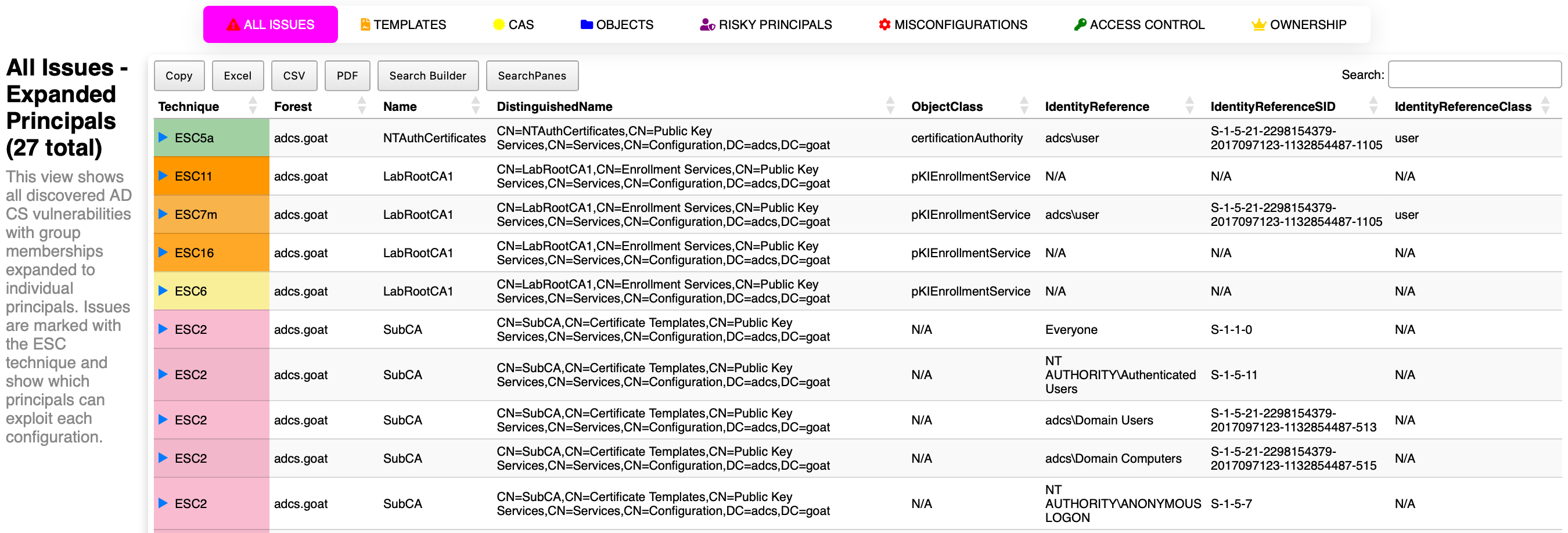
If you’re looking to try something new and exciting, you can try Locksmith 2! Locksmith 2 does not have complete feature parity with the original Locksmith yet. For example, identified issues do not currently have severity associated with them, but LS2 doesn’t require the Active Directory module and it creates a neat dashboard that can export results to Excel, CSV, and PDF!
<#
Prerequisites:
  - PowerShell 5.1
#>

# Install and Import Locksmith 2 from the PowerShell Gallery
Install-Module -Name Locksmith2 -Scope CurrentUser -Force
Import-Module -Name Locksmith2 -Force

# Run Locksmith 2 with no parameters to get LS2Issue objects which describe the AD CS environment in detail
Invoke-Locksmith2

# Create a new Locksmith 2 Dashboard
New-LS2Dashboard
Example Dashboard:
Conclusion
Disabling a dangerous certificate template is a great first step, but it’s rarely the last step. If a low-privileged principal can modify the certificateTemplates property on a pKIEnrollmentService object, they can reenable that template whenever they want… and you’re back to square one (minus a pony).
The key takeaways:
- Remediate the template itself, not just its enrollment status. Delete it if you can, but harden it if you can’t.
- Lock down the
certificateTemplatesproperty on everypKIEnrollmentServiceobject. Only AD and AD CS Admins should be able to modify it. - Audit regularly. Tools like Locksmith and Locksmith 2 can help you spot these issues before attackers do.
AD CS security is a multi-layered problem, and fixing one layer while leaving another exposed just kicks the can down the road. Take the time to address each layer, and you’ll get to keep your pony.
Thanks for reading, friends! 💙