Sysadmin Saturday
Good morning, y’all!
It’s one of my (least) favorite times of the year: Sysadmin Saturday!
When I worked for the City of Bowling Green, Ohio, I often woke up early on Saturday to do sysadmin stuff. Patching servers, updating definitions, checking logs, blah blah blah. But for the last five years, I haven’t had to do any of that.
Instead, all the sysadmin work I do on weekends is now by choice. 😭
Task 1: Update Vaultwarden Server
Vaultwarden is:
An alternative server implementation of the Bitwarden Client API, written in Rust and compatible with official Bitwarden clients [disclaimer], perfect for self-hosted deployment where running the official resource-heavy service might not be ideal.
I’ve been hosting my own password vaults for about 8 years now. I started with Enpass because it supported self-hosting, iOS, macOS, and Windows. After a year or two, I moved to LastPass because I got a free license by working for CoBG. The LastPass experience was fine… until they got compromised. So I moved back to Enpass for a while. But Enpass’ quality just kept getting worse over the last few years. Eventually, it got bad enough to force me to deploy Vaultwarden.
To clarify: I know it’s probably easier to throw stuff up on 1Password, but I still get sketched out by handing over all my passwords/passkeys to a third-party. Thanks, LastPass!
Every 2-3 months, I remember that I am self-hosting my vaults. And every 2-3 months, I forget all the steps I want to perform to upgrade stuff. So now I’m documenting it:
ssh user@my.vault.host
sudo apt update
sudo apt upgrade -y
cd /mnt/vaultwarden
docker compose pull
docker compose up -d
Task 2: Make Ghostty Work in an SSH Session
Back story: I started using Ghostty as my primary terminal a couple months ago. It’s fast and pretty and easy to configure. I’ve configured it to use pwsh as the default shell and integrated it w/ Alfred using some AppleScript I found laying around on the interwebs: https://github.com/zeitlings/alfred-ghostty-script. Now, when I press ⌘+Space and type > <some command>, Ghostty pops open a new window (never new tabs!) running pwsh and runs the command. V slick.
Today: while I was SSHed into my.vault.host performing upgrades, I decided I wanted to add the upgrade instruction to the Message of the Day (MOTD) so I could copy-paste them into the terminal when it was time for maintenance. (Yes, I know this is probably a better choice for a script. I like playing!)
I did a little research into how to edit the MOTD on Ubuntu and found this: https://wiki.ubuntu.com/UpdateMotd#Design I really appreciate the simplicity of using a bunch of tiny bash scripts composed into a large message. I tried to open one of the existing component scripts using the best text editor, nano, and got hit with this:
user@vaultwarden-vm$ nano /etc/update-motd.d/97-overlayroot
Error opening terminal: xterm-ghostty.
Thankfully, Ghostty is very well-documented, so good ol’ Google actually found an answer for me without the AI Overview: https://ghostty.org/docs/help/terminfo#ssh Without further ado, I ran the following command:
infocmp -x xterm-ghostty | ssh user@my.vault.host -- tic -x -
As foretold by the article, I got a warning, but when I SSHed back into my.vault.host, I was able to look at the MOTD scripts. But when I tried to create my own, I realized the /etc/update-motd.d scripts are all locked down. So, I did:
user@vaultwarden-vm$ sudo nano /etc/update-motd.d/99-upgrade-process
Error opening terminal: xterm-ghostty.
Apparently, the terminfo stuff needs to be copied over for superuser too? I dunno man. I’m not a Unix guy really. Anyway, this fixed it right up:
infocmp -x xterm-ghostty | ssh user@my.vault.host -- sudo tic -x -
After that, Ghostty works perfectly!
Task 3: Convert to Unifi’s Zone-Based Firewall
Unifi has been bugging me to upgrade to their Zone-Based Firewall for years. I keep avoiding because… if it ain’t broke, don’t fix it. BUT, I just deployed a new lab server (thanks, Semperis!) that I plan to do LLM security work on. I absolutely do not want to let clankers to run roughshod over my home or work VLANs, so today was the day to pull the trigger.
Thanks, Ubiquiti, for making the Zone-Based Firewall so easy to use! When things are split into zones, it’s so much easier to understand what the heck is happening with data flows.
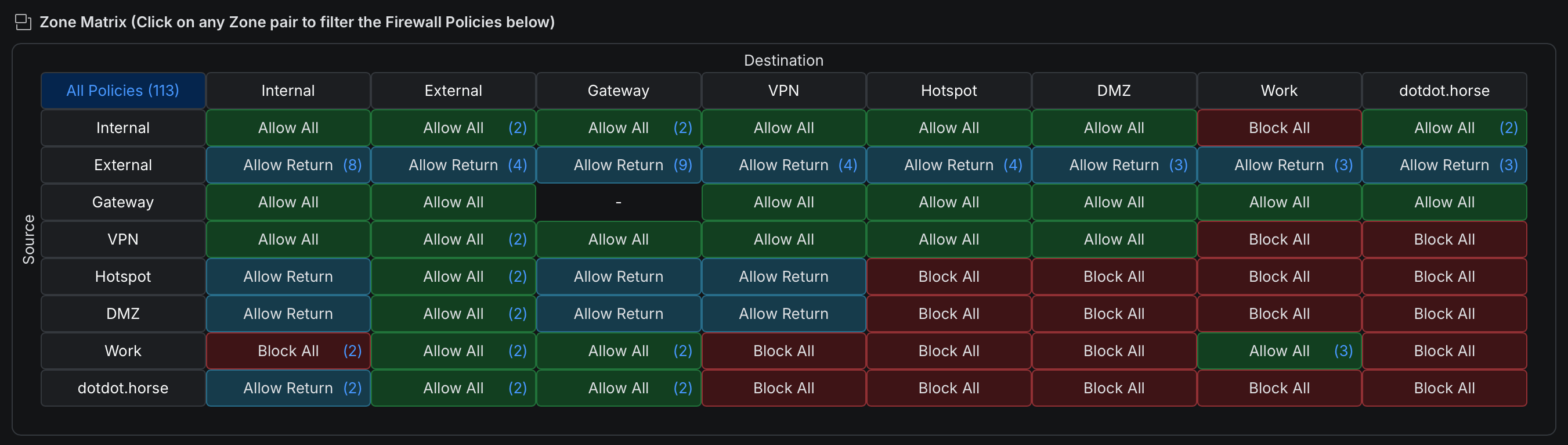
I would’ve killed for something like this back when I was doing firewall administration!
That’s all for today. Maybe now I can stop procrastinating on my slides for my Wild West Hackin’ Fest.
But probably not.